

Transform your work environment! Learn how digital workspaces boost productivity, enable seamless remote work, and enhance collaboration.
Ultimate guide with step-by-step implementation, security tips, and real-world examples. Start building your modern workplace today!
Imagine walking into your office, grabbing your coffee, and sitting down at your desk—all without leaving your home.
This isn’t science fiction; it’s the reality of digital workspaces, transforming how we work, collaborate, and live in ways we never imagined just a decade ago.
Summary Box
In this comprehensive guide, you’ll discover how digital workspaces are revolutionizing the modern workplace. We’ll explore what digital workspaces are, their key benefits, essential features, implementation strategies, security considerations, and practical steps to transform your work environment.
Whether you’re a business leader, IT professional, or remote worker, this guide will help you harness the power of digital workspaces to boost productivity, enhance collaboration, and achieve a better work-life balance.
Estimated Read Time: 12 minutes
What Is a Digital Workspace?
A digital workplace is a single platform that provides workers with secure access to all the tools, data, and apps they need to do their jobs, regardless of where they are, which device they use, or what time zone they are in.
It’s essentially a virtual desktop that extends beyond physical office walls, creating a seamless work experience that blends personal and professional environments.
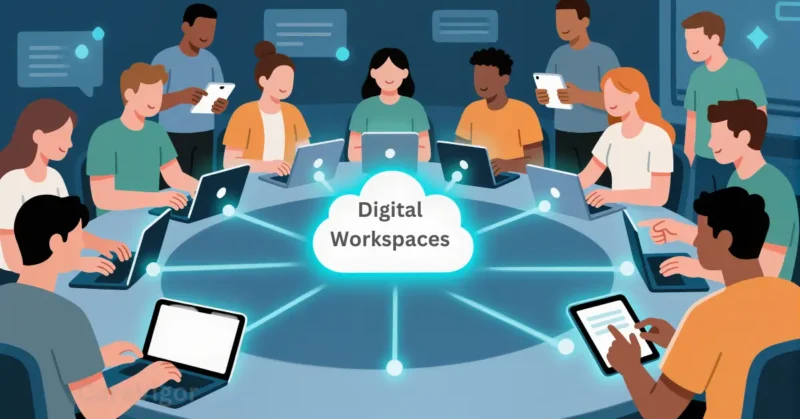
Think of it as your digital briefcase, office, and meeting room all rolled into one accessible space.
Digital workspaces leverage cloud computing, virtualization, and collaboration technologies to deliver applications and data to users consistently and securely across any device—from laptops and tablets to smartphones.
Who Needs a Digital Workspace?
Digital workspaces aren’t just for large corporations or tech-savvy companies. They benefit organizations of all sizes and across various industries:
- Remote and hybrid teams: Employees working from home, co-working spaces, or while traveling
- Organizations with multiple office locations: Ensuring consistent experiences across different sites
- Businesses undergoing digital transformation: Moving from traditional to modern IT infrastructures
- Companies with BYOD (Bring Your Own Device) policies: Managing personal devices used for work
- Healthcare and financial institutions: Requiring secure access to sensitive data
- Educational institutions: Supporting remote learning and flexible teaching environments
- Government agencies: Needing secure, compliant access to information
Digital Workspaces vs. Digital Workplaces: What’s the Difference?
While these terms are often used interchangeably, they refer to different concepts:
Digital Workspaces focus on the tools and technologies that enable digital work. They’re about the “how”—the applications, platforms, and infrastructure that deliver work capabilities to users.
Digital Workplaces, on the other hand, encompass the broader ecosystem of digital tools, processes, and culture that define the modern work environment.
They include not just the technology but also the policies, practices, and experiences that shape how work gets done.
In essence, digital workspaces are part of the broader digital workplace concept. You can have a digital workspace without a fully developed digital workplace, but you can’t have a digital workplace without digital workspaces.
Understanding Digital Workspaces and Their Benefits
What Are Digital Workspaces and How Do They Work?
Digital workspaces integrate multiple technologies to deliver a unified user experience. At their core, they combine:
- Virtual desktop infrastructure (VDI): Hosting desktops and applications centrally in the cloud
- Identity and access management: Ensuring the right people access the right resources
- Application virtualization: Delivering applications without installing them locally
- Unified communications: Bringing together messaging, video conferencing, and phone systems
- Collaboration tools: Enabling real-time teamwork across locations
When a user accesses their digital workspace, the system authenticates them, delivers their personalized desktop environment with all necessary applications, and maintains security through encryption, access controls, and monitoring.
This happens seamlessly whether the user is on a company laptop, their personal tablet, or a public computer.
Benefits of Digital Workspaces for Employees and Employers
Benefits for Employees
Digital workspaces empower employees with:
- Flexibility: Work from anywhere, at any time, on any device
- Consistency: The same work experience regardless of location or device
- Productivity: Faster access to applications and data with reduced IT delays
- Work-life balance: Eliminate commutes and create personalized work environments
- Collaboration: Seamless teamwork with colleagues across different locations
- Reduced IT friction: Self-service options for common tasks and issues
Benefits for Employers
Organizations gain significant advantages from implementing digital workspaces:
- Cost savings: Reduced hardware expenses, lower IT maintenance costs, and optimized resource usage
- Enhanced security: Centralized security controls and reduced risk of data breaches
- Scalability: As business needs change, adding or removing users is simple.
- Business continuity: Ensure operations continue during disruptions or disasters
- Talent attraction: Access to global talent pools without geographical constraints
- Sustainability: Reduced physical infrastructure and energy consumption
Key Features of Digital Workspaces

Virtual Desktops and Apps in Digital Workspaces
What Are Virtual Desktops?
Virtual desktops are cloud-based desktop environments that replicate the traditional office desktop experience.
Instead of running applications and storing data on a local computer, everything is hosted in the cloud and accessed over the internet.
Key characteristics of virtual desktops include:
- Centralized management: IT administrators can update, secure, and manage desktops from a single console
- Device independence: Users can access their desktop from any device with an internet connection
- Consistent experience: All users have the same software and settings regardless of their hardware
- Resource optimization: Computing power is used more efficiently than with traditional desktops
- Enhanced security: Data remains in the data center, reducing exposure to local devices
Role of Virtual Apps in Digital Workspaces
Virtual applications complement virtual desktops by providing:
- On-demand access: Users access applications only when needed, reducing resource consumption
- Simplified management: IT can deploy, update, and retire applications without touching end-user devices
- Bandwidth efficiency: Applications stream to devices rather than requiring full installation
- Compatibility: Legacy applications can run on modern devices without compatibility issues
- Licensing optimization: More precise control over software licensing and usage
Collaboration Tools and Communication in Digital Workspaces
Essential Collaboration Platforms
Modern digital workspaces integrate powerful collaboration tools that enable:
- Real-time document editing: Several people can collaborate on the same paper at once.
- Project management: Track tasks, deadlines, and progress across teams
- Knowledge sharing: Centralized repositories for information and best practices
- Team workspaces: Dedicated environments for specific projects or departments
- Integration capabilities: Link your other tools and systems to your digital ecosystem.
Popular collaboration platforms include Microsoft Teams, Slack, Asana, Trello, and Notion, each offering different strengths for various collaboration needs.
Communication Systems in Digital Workspaces
The foundation of every digital workspace is effective communication, which includes:
- Unified messaging: Instant messaging, voice, and video in a single platform
- Video conferencing: High-quality virtual meetings with screen sharing and recording
- Voice over IP (VoIP): Business phone capabilities integrated with other communication tools
- Presence indicators: See who’s available and the best way to reach them
- Meeting scheduling: Coordinate across time zones and calendar systems
These communication tools work together to create the “virtual office” experience, replacing face-to-face interactions with digital alternatives that are nearly as effective.
Implementing Digital Workspaces in Your Organization
Choosing the Right Digital Workspace Solution for Your Business
Assessing Your Organization’s Needs
Before selecting a digital workspace solution, evaluate:
- User requirements: What applications and resources do employees need?
- Security requirements: What level of data protection and compliance is needed?
- Budget constraints: What can you afford in terms of initial investment and ongoing costs?
- IT capabilities: What technical expertise and resources do you have available?
- Integration needs: What systems must the digital workspace connect with?
- Scalability requirements: How will your needs grow over time?
Evaluating Digital Workspace Providers
When comparing providers, consider:
- Technology stack: Does it support your applications and devices?
- Security features: What protections does it offer for data and access?
- User experience: Is it simple and intuitive to use?
- Support services: What level of technical support is available?
- Pricing model: Is it cost-effective for your usage patterns?
- Reputation and references: What do other customers say about their experience?
With varying strengths and specializations, well-known suppliers of digital workspaces include Microsoft (Azure Virtual Desktop), VMware (Horizon), Citrix (Virtual Apps and Desktops), and Amazon (WorkSpaces).
Best Practices for Deploying and Managing Digital Workspaces
Implementation Strategies
Successful digital workspace deployment requires:
- Phased rollout: Start with a pilot group before full implementation
- Change management: Communicate benefits and address concerns proactively
- Training programs: Ensure users know how to use the new tools effectively
- Performance monitoring: Continuously assess system performance and user experience
- Feedback mechanisms: Collect and act on user input for continuous improvement
Ongoing Management Practices
Effective digital workspace management includes:
- Regular updates: Keep systems patched and current with the latest features
- Access reviews: Periodically verify who has access to what resources
- Usage analytics: Monitor how tools are being used to identify optimization opportunities
- Security audits: Regularly assess security controls and compliance
- Capacity planning: Ensure resources scale to meet growing demands
Security and Compliance in Digital Workspaces

Ensuring Data Security in Digital Workspaces
Core Security Measures
Protecting data in digital workspaces requires implementing:
- Multi-factor authentication (MFA): Requires multiple verification methods for access
- Zero-trust architecture: Verify every access request regardless of source
- Encryption: Safeguard data in transit and at rest.
- Endpoint security: Secure all devices that access the digital workspace
- Access controls: Implement least privilege access and role-based permissions
- Monitoring and alerts: Identify suspicious activity and take appropriate action
Data Protection Strategies
Additional measures to safeguard sensitive information include:
- Data loss prevention (DLP): Prevent unauthorized transmission of confidential data
- Secure file sharing: Implement controlled methods for sharing files internally and externally
- Backup and recovery: Ensure regular backups and tested recovery procedures
- Incident response: Plan for and practice responding to security incidents
- Security awareness training: Educate users on security best practices and threats
Compliance and Regulatory Considerations for Digital Workspaces
Understanding Compliance Requirements
Different industries and regions have specific compliance requirements:
- Healthcare: HIPAA for patient data protection
- Finance: PCI DSS for payment card information, SOX for financial reporting
- Government: FedRAMP for cloud services, various data sovereignty requirements
- International: GDPR for personal data protection in the EU, CCPA in California
Achieving and Maintaining Compliance
To ensure your digital workspace meets regulatory requirements:
- Regular assessments: Conduct periodic compliance audits
- Documentation: Maintain records of policies, procedures, and controls
- Vendor management: Ensure third-party providers meet your compliance standards
- Policy updates: Adapt to changing regulations and requirements
- Training: Ensure staff understand compliance obligations
Challenges to Overcome in Digital Workspace Implementation
Common Implementation Challenges
Organizations often face these obstacles when implementing digital workspaces:
- User resistance: Employees comfortable with traditional work methods may resist change
- Complex integration: Connecting with existing systems and workflows can be challenging
- Performance concerns: Users may experience latency or reliability issues
- Security risks: Expanded access points increase potential vulnerabilities
- Cost management: Initial investment and ongoing expenses can exceed expectations
- Skills gap: IT teams may lack expertise in new technologies
Strategies for Overcoming Challenges
Address these challenges with:
- Change management programs: Communicate benefits and provide adequate training
- Phased implementation: Start small and expand based on lessons learned
- Performance optimization: Monitor and address performance issues proactively
- Security by design: Build security into the workspace from the ground up
- Total cost of ownership analysis: Consider both direct and indirect costs
- Professional development: Invest in training for IT staff and users
Digital Workspace Use Cases
Remote Work Enablement
Digital workspaces make remote work seamless by:
- Providing access to all necessary applications from any location
- Ensuring consistent experiences regardless of device or network
- Enabling secure access to company resources from home or public networks
- Facilitating collaboration among distributed team members
- Supporting work-life balance through flexible access to work resources
Business Continuity and Disaster Recovery
Digital workspaces enhance organizational resilience by:
- Allowing work to continue during office closures or disruptions
- Enabling rapid scaling during periods of high demand
- Facilitating quick onboarding of remote workers during emergencies
- Providing backup access when primary systems are unavailable
- Supporting geographically dispersed teams during crises
Mergers and Acquisitions Integration
Digital workspaces simplify complex organizational changes by:
- Creating unified work environments across merged organizations
- Standardizing applications and processes for all employees
- Facilitating secure access to shared resources during transitions
- Reducing the time needed for integration and productivity recovery
- Supporting cultural alignment through consistent digital experiences
How to Deploy Successful Digital Workspaces
Key Success Factors
Successful digital workspace deployments share these characteristics:
- Executive sponsorship: Leadership support and visible commitment
- Clear objectives: Defined goals and measurable outcomes
- User-centric design: Focused on employee needs and experiences
- Phased approach: Gradual rollout with continuous feedback
- Adequate resources: Sufficient budget, staff, and technology
- Ongoing optimization: Regular assessment and improvement
Measuring Success
Evaluate your digital workspace implementation by tracking:
- User adoption rates: Percentage of employees actively using the workspace
- Productivity metrics: Changes in output, efficiency, and quality
- Satisfaction levels: Employee feedback and satisfaction scores
- Cost savings: Reductions in IT expenses, hardware costs, and travel
- Security metrics: Incidents, compliance status, and access patterns
- Business outcomes: Impact on revenue, customer satisfaction, and innovation
What Are Common Mistakes and How to Avoid Them?
Underestimating User Experience
Many organizations focus too heavily on technical aspects while neglecting the user experience, leading to poor adoption and satisfaction.
How to avoid: Involve users in the design process, conduct usability testing, and prioritize simplicity and intuitive interfaces over complex features.
Neglecting Change Management
Technical implementation alone doesn’t guarantee success. Without proper change management, users may resist adopting new tools and processes.
How to avoid: Develop a comprehensive change management plan that includes communication, training, and support tailored to different user groups.
Overlooking Security from the Start
Security is often an afterthought rather than a core design principle, creating vulnerabilities and compliance issues.
How to avoid: Implement a security-by-design approach with a zero-trust architecture, regular assessments, and continuous monitoring from the outset.
Failing to Plan for Integration
Digital workspaces don’t exist in isolation. Without proper integration with existing systems, they can create silos and inefficiencies.
How to avoid: Conduct thorough integration planning, use APIs and middleware for connectivity, and ensure data flows seamlessly across systems.
Ignoring Performance and Reliability
Poor performance or unreliable access can frustrate users and undermine the value of digital workspaces.
How to avoid: Conduct thorough testing, implement monitoring systems, establish performance benchmarks, and have contingency plans for outages.
7-Step Effective Action Plan for Implementing Digital Workspaces
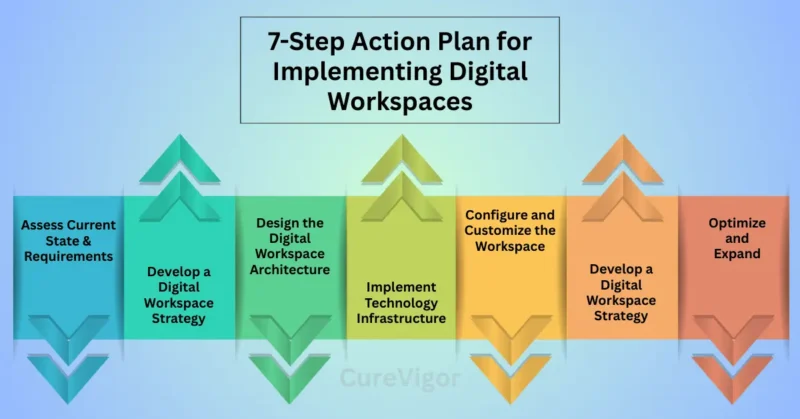
Step 1: Assess Current State and Requirements
- Inventory existing applications, data, and workflows
- Identify user needs and pain points.
- Evaluate current IT infrastructure and capabilities.
- Define specific objectives and success metrics.
- Document compliance requirements
Step 2: Develop a Digital Workspace Strategy
- Define scope and priorities based on business needs.
- Select an appropriate technology stack and providers.
- Create an implementation roadmap with clear milestones.
- Develop a budget and resource plan.
- Establish a governance and change management approach.
Step 3: Design the Digital Workspace Architecture
- Design access and security models
- Plan integration with existing systems
- Define user experience and interface requirements.
- Establish data management and backup strategies.
- Create performance and scalability plans.
Step 4: Implement Technology Infrastructure
- Deploy virtual desktop and application infrastructure.
- Set up identity and access management systems.
- Configure security controls and monitoring
- Implement collaboration and communication tools.
- Establish connectivity and network requirements.
Step 5: Configure and Customize the Workspace
- Customize user interfaces and experiences.
- Deploy applications and data resources.
- Configure security policies and access controls.
- Set up monitoring and reporting systems.
- Integrate with business systems and workflows.
Step 6: Deploy and Train Users
- Conduct pilot testing with representative users.
- Gather feedback and make necessary adjustments.
- Develop and deliver training programs.
- Create support resources and documentation.
- Communicate benefits and address concerns.
Step 7: Optimize and Expand
- Monitor usage and performance metrics.
- Gather ongoing user feedback.
- Address issues and implement improvements.
- Expand deployment to additional users or functions.
- Plan for future enhancements and innovations
Practical Checklist for Digital Workspace Implementation
Planning Phase
- Define clear objectives and success metrics.
- Secure executive sponsorship and budget approval.
- Identify key stakeholders and their requirements.
- Assess current infrastructure and capabilities.
- Create a detailed project plan with milestones.
Technology Selection
- Evaluate multiple vendor options.
- Assess compatibility with existing systems.
- Verify security capabilities and compliance.
- Consider scalability and future needs.
- Review vendor references and case studies.
Security Considerations
- Implement multi-factor authentication
- Define access control policies.
- Plan data encryption strategies
- Establish monitoring and alerting systems.
- Create incident response procedures.
User Experience
- Design intuitive interfaces and workflows.
- Ensure consistent experience across devices.
- Plan for accessibility requirements
- Develop training and support resources.
- Create feedback mechanisms for continuous improvement.
Deployment
- Conduct thorough testing
- Plan a phased rollout approach.
- Develop a communication strategy.
- Prepare the support team for questions.
- Establish performance baselines
Post-Implementation
- Monitor adoption and usage patterns.
- Gather user feedback and satisfaction data.
- Address issues and implement improvements.
- Document lessons learned
- Plan for ongoing optimization
Frequently Asked Questions About Digital Workspaces
Q: Are digital workspaces secure enough for sensitive data?
Digital workspaces can be more secure than traditional IT environments when properly implemented.
By centralizing data in secure data centers with robust encryption, access controls, and monitoring, organizations can often achieve better security than with distributed data on individual devices.
However, security depends on proper configuration, ongoing management, and user awareness. The most effective approach combines technical controls, policies, and training to create a comprehensive security posture that protects sensitive data across all access points.
Q: How much does implementing a digital workspace typically cost?
The cost of implementing a digital workspace varies significantly based on organization size, complexity, technology choices, and deployment approach. Initial costs typically include licensing, hardware, implementation services, and training.
Ongoing costs encompass subscriptions, maintenance, support, and bandwidth. Many organizations find that digital workspaces lower total cost of ownership by reducing hardware costs, reducing IT support needs, and improving productivity.
Before choosing an investment, a thorough evaluation of your unique needs and potential returns is crucial.
Q: Can digital workspaces work with legacy applications?
Yes, modern digital workspace solutions are designed to work with legacy applications through various approaches. Application virtualization can deliver legacy applications without requiring installation on local devices.
Thin clients can run older applications with minimal resource requirements. Compatibility layers can bridge gaps between legacy software and modern operating systems.
The key is to assess your legacy applications early in the planning process and select a digital workspace solution that can accommodate them effectively, potentially with some modernization efforts for critical applications.
Q: How do digital workspaces impact employee productivity?
Digital workspaces typically enhance employee productivity in several ways. They reduce time spent on IT issues through self-service options and centralized management.
They enable faster access to applications and data from any location or device. They facilitate better collaboration through integrated communication and teamwork tools.
They minimize downtime through robust backup and recovery systems.
However, productivity gains depend on proper implementation, user training, and adoption. Organizations that focus on user experience and provide adequate training tend to achieve the greatest productivity improvements.
Q: What kind of internet connection is needed for digital workspaces?
Digital workspaces can function with various internet connection types, but performance depends on bandwidth, latency, and reliability. For basic productivity tasks such as email and document editing, even modest broadband speeds (5-10 Mbps) may suffice.
For more demanding applications like video conferencing or graphic design, higher bandwidth (25+ Mbps) and lower latency are recommended. Redundant connections can provide failover capabilities during outages.
Modern digital workspace solutions often include optimization techniques to perform well even with limited bandwidth, but organizations should assess their specific requirements and network capabilities during planning.
Q: How do digital workspaces support remote work?
Digital workspaces are fundamentally designed to support remote work by providing secure access to all necessary resources from any location. They enable employees to use their preferred devices while maintaining consistent experiences.
They facilitate collaboration through integrated communication and teamwork tools. They ensure security through centralized controls and monitoring. They support work-life balance by allowing flexible work arrangements.
For organizations embracing remote or hybrid work models, digital workspaces provide the infrastructure needed to maintain productivity, security, and employee satisfaction regardless of physical location.
Q: Can digital workspaces scale to support business growth?
Yes, digital workspaces are inherently scalable and well-suited to support business growth.
Cloud-based solutions can rapidly add or remove users as needs change. Resource allocation can be adjusted dynamically to match demand.
New applications and services can be integrated as business requirements evolve. Geographic expansion is simplified through centralized management.
Organizations experiencing rapid growth often find digital workspaces more adaptable than traditional IT infrastructure, allowing them to scale operations without proportional increases in complexity or cost.
However, planning for growth during initial implementation ensures the solution can effectively accommodate future needs.
My Experience with Digital Workspaces
In my experience implementing digital workspaces across multiple organizations, I’ve witnessed firsthand how transformative they can be.
One particularly memorable experience occurred during a company merger, when two distinct cultures and systems needed to come together.
The digital workspace we implemented served as a bridge, enabling employees from both organizations to collaborate effectively while maintaining their preferred tools and workflows.
What struck me most was how quickly employees adapted once they experienced the benefits firsthand. Initially, there was resistance—concerns about security, performance, and change.
But once people realized they could access everything they needed from any device, collaborate seamlessly with colleagues across locations, and work flexibly around their personal lives, the adoption was remarkable.
I’ve also seen how digital workspaces can level the playing field for employees with different circumstances.
A new parent working reduced hours, an employee with a disability requiring specific accommodations, or a team member in a different time zone. Everyone can contribute equally when the digital workspace removes physical barriers and creates inclusive access to opportunities.
Final Thoughts
The transition to digital workspaces represents more than just a technological upgrade—it’s a fundamental transformation in how we work, collaborate, and live.
As we’ve explored throughout this guide, digital workspaces offer tremendous potential to enhance productivity, improve work-life balance, and create more inclusive, flexible work environments.
Remember that implementing digital workspaces is a journey, not a destination. Start with clear objectives, focus on user experience, prioritize security, and continuously gather feedback to refine your approach.
The most successful implementations are those that balance technological capabilities with human needs, creating solutions that work for people rather than forcing people to adapt to technology.
As you embark on your digital workspace transformation, approach it with curiosity, patience, and a commitment to continuous improvement.
The benefits—increased agility, enhanced security, greater flexibility, and improved employee satisfaction—are well worth the investment of time and resources.
Ready to transform your work environment with digital workspaces? Start by downloading our comprehensive Digital Workspace Readiness Assessment tool to evaluate your organization’s needs and readiness.
To access this free resource and arrange a meeting with our experts in digital workspaces to help you create and implement a solution tailored to your unique needs, visit our website.
Don’t let outdated technology limit your organization’s potential. Embrace the future of work with digital workspaces and unlock new levels of productivity, flexibility, and innovation today!
Read more articles on Health and Balance.
You might like: