

Organize your digital life with 3 simple tips. Reduce digital clutter, improve productivity, manage stress, and create a calm digital environment for busy people.
Thank you for reading this post, don't forget to subscribe!Hundreds of unread emails, scattered files, endless browser tabs, and reminders I forgot to check.
Every notification pulled my attention in a different direction. Instead of helping me live better, my digital life was quietly draining my peace.
How To Organize Your Digital Life in A Calm Way
There was a quiet evening when I opened my laptop to finish a simple task—but instead of working, I found myself searching. This was a time when my laptop felt heavier than my responsibilities.
Not physically—but mentally. A document here, an email there, and dozens of open tabs whispering for attention. Notifications blinking. Files scattered. Messages unanswered.
Nothing dramatic had happened. Yet I felt exhausted.
In that moment, I realized something gentle but powerful: my digital life was shaping my inner life. The clutter on my screen had quietly become clutter in my mind.
In the evening, after searching for a document for nearly 20 minutes, I paused and asked myself a simple question: Is my digital world serving me, or am I serving it?
That moment became a turning point. I didn’t need complex systems or fancy apps. I needed clarity, simplicity, and mindful organization.
If your devices feel overwhelming instead of helpful, this write-up will help you organize your digital life with calm, practical steps — so your technology supports your well-being, productivity, and peace of mind.
If you’ve ever felt overwhelmed by emails, distracted by endless notifications, or mentally drained by digital chaos, you’re not alone.
The modern world demands that we manage enormous streams of information every day. But organizing your digital life doesn’t require complicated systems or perfect discipline.
It requires simplicity, clarity, and mindful attention.
This guide offers three simple tips to help you organize your digital life calmly—so your technology supports your well-being, focus, and peace.
Quick Summary Box
Estimated Read Time: 14–17 minutes
In this guide, you’ll learn:
- How to organize your digital life without overwhelm
- 3 simple principles to reduce digital clutter
- Ways to improve focus and productivity
- How digital organization supports stress reduction and self-care
- A gentle routine for busy people
- Benefits, challenges, checklist, and FAQs
Best for: Busy people, parents, professionals, students, and anyone seeking calm digital living.
Why Mindful Digital Organization Matters in Modern Life
Your digital environment shapes your mental environment. Our digital environment is not separate from our emotional life. It structures how we think, feel, and respond.
A messy digital life leads to a messy mind.
When your digital life is scattered, you may notice:
- constant distraction
- difficulty focusing
- decision fatigue
- mental exhaustion
- reduced productivity
- emotional overwhelm
We rarely notice the weight of digital clutter until we pause.
As someone balancing work, family, and personal growth, I realized that digital clarity supports emotional balance. When devices feel calm, life feels calmer.
Organizing your digital life is not about control — it’s about creating space to live peacefully.
What It Means to Organize Your Digital Life
Digital organization is not about perfection or complex systems.
It simply means:
- reducing digital noise
- creating simple places for information
- managing attention intentionally
- using technology with awareness
- supporting focus and well-being
Your digital life should feel supportive, not demanding.
3 Simple Tips for Organizing Your Digital Life
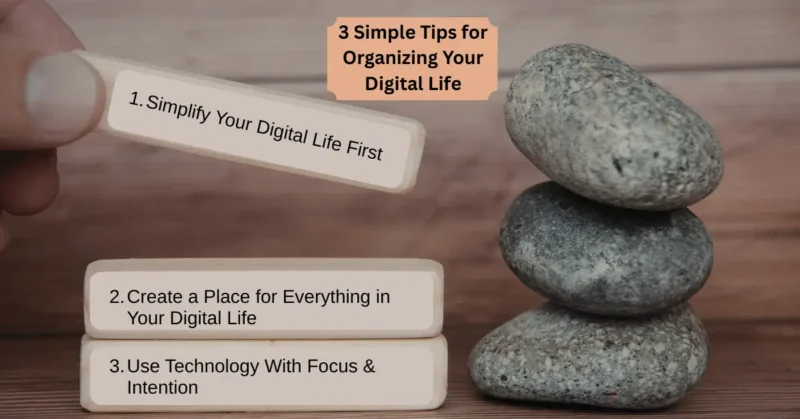
These three principles are simple enough for busy people and powerful enough to transform daily experience.
They require no special tools — only small shifts in awareness and habit.
Tip #1: Simplify Your Digital Life First
Before organizing anything, begin with less.
Trying to organize excessive digital clutter is like arranging a crowded room — exhausting and temporary. But when you remove what you don’t need, clarity naturally appears.
Simplification is the foundation of digital peace.
Let Your Email Inbox Breathe
Email is often the heaviest source of digital stress. Messages accumulate silently, creating mental pressure.
Begin gently.
You might:
- Archive emails that require no action
- Reply quickly to simple messages.
- unsubscribe from newsletters you rarely read
- Delete spam immediately
- Create one simple folder for action items.
You don’t need an empty inbox — only a manageable one.
I began clearing my inbox weekly, and the lightness I felt afterward surprised me. It wasn’t just organization — it was relief.
Release Unnecessary Browser Tabs
Each open tab represents unfinished attention. Over time, dozens of tabs quietly drain mental energy.
Try closing what you’re not using. If something feels important, bookmark it.
You can create simple folders such as:
- Work
- Reading
- Research
- Personal
A calmer browser creates a calmer mind.
Clear Your Files and Desktop
Many of us store years of digital files without reflecting on them. Old downloads, duplicate documents, forgotten images—they quietly accumulate.
Start by deleting what you no longer need. Move older items into an archive folder. Keep your desktop minimal.
Clarity emerges when visual clutter disappears.
Reduce Apps and Notifications
Too many apps compete for attention. Notifications interrupt thought and fragment focus.
Consider gently simplifying:
- remove unused apps
- silence non-essential notifications
- Keep only helpful tools.
- Review subscriptions monthly
Less digital noise means more presence.
Tip #2: Create a Place for Everything in Your Digital Life
Once you simplify, create simple homes for what remains. Organization becomes effortless when everything has a clear place. You don’t need complex systems—only consistency.
Organize Emails With Gentle Structure
Use a few simple categories rather than complicated rules.
You might create:
- Action Required
- Waiting or Follow-Up
- Reference
- Personal
Check action items regularly and clear other folders weekly. Simple systems are easier to maintain.
Keep Notes and Ideas in One Place
Ideas lose value when scattered across apps.
Choose one primary tool for notes and organize broadly:
- Work
- Learning
- Personal
- Projects
Avoid overthinking structure. Search functions can help you find what you need.
Organize Computer Files Simply
Your digital files should follow clear logic.
You might use broad folders such as:
- Documents
- Photos
- Projects
- Finances
- Personal Records
Avoid deep layers of folders. Keep navigation intuitive.
Manage Tasks With Clarity
When tasks live everywhere — emails, notes, reminders — the mind becomes overwhelmed.
Instead, keep:
- one master list of tasks
- a daily priority list
- weekly review time
Moving tasks out of your head creates mental freedom.
Tip #3: Use Technology With Focus and Intention
Even a perfectly organized system fails without mindful use.
How you interact with your digital life determines its impact.
Practice Single-Tasking
We often try to do multiple things at once — responding to messages while working and constantly switching between tasks.
But attention works best when focused.
You may notice improvement when you:
- work on one task at a time
- Close unrelated apps
- Use full-screen mode
- Complete tasks before switching
Focused attention brings calm productivity.
Create Healthy Digital Boundaries
Technology should support your priorities, not control them.
Consider gentle boundaries:
- Check email at scheduled times.
- create screen-free hours
- Avoid devices before sleep.
- protect time with loved ones
Boundaries restore balance.
Design a Calm Digital Environment
Your environment shapes behavior.
A simple digital space might include:
- a clean desktop
- minimal visual clutter
- calming background images
- distraction blockers when needed
A peaceful space encourages focused work.
Simple Ways to Build Sustainable Digital Habits
Organization is not a one-time event—it is a rhythm.
Start Small to Improve Your Digital Life
Choose one habit first:
- clear inbox weekly
- Close tabs daily
- Organize files monthly
Small, consistent actions create lasting change.
Use Daily Triggers
Attach digital habits to existing routines.
For example:
- clear notifications before sleep
- Review tasks after morning tea.
- Organize files after finishing work.
Habits grow naturally when connected to daily life.
Accept Imperfection
Your digital life will never remain perfectly organized—and that’s okay.
Progress matters more than perfection.
Benefits of Organizing Your Digital Life
When your digital environment becomes calm, life changes in subtle but meaningful ways.
You Experience Less Stress
Clarity reduces cognitive overload and anxiety.
Your Productivity Improves
You spend less time searching and more time creating.
Your Focus Deepens
Fewer distractions allow meaningful work.
Your Relationships Improve
Presence increases when devices demand less attention.
Your Life Feels More Balanced
Technology can begin to support your wellbeing rather than drain it.
Challenges You May Face (And Gentle Solutions)
Every change brings challenges.
You may experience:
- feeling overwhelmed → start with one area
- returning old habits → create weekly reset time
- trying too many tools → choose fewer systems
- lack of time → use short sessions
- difficulty maintaining order → review regularly
Patience makes the process easier.
A Simple Digital Life Checklist
Daily
- Close unnecessary tabs
- clear notifications
- update task list
- keep desktop clean
Weekly
- clean inbox
- organize files
- review notes and tasks
Monthly
- remove unused apps
- archive old documents
- review subscriptions
Consistency creates calm.
A Gentle Routine for Busy People
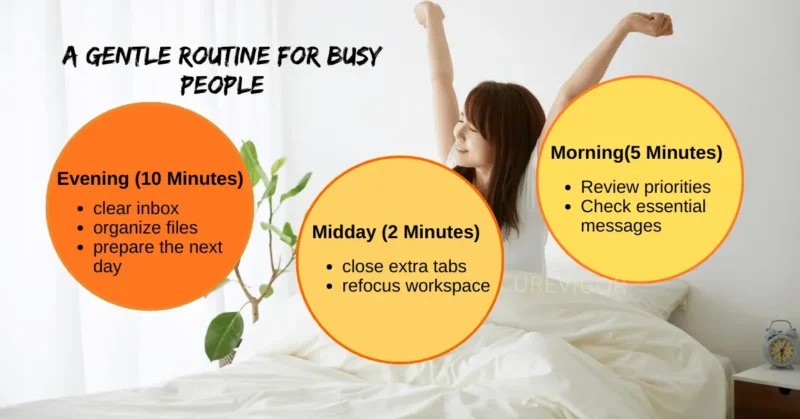
You don’t need hours of organization — only small daily moments.
Morning (5 Minutes)
- review priorities
- Check essential messages
Midday (2 Minutes)
- close extra tabs
- refocus workspace
Evening (10 Minutes)
- clear inbox
- organize files
- prepare the next day
This simple rhythm prevents digital chaos.
Summary
Organizing your digital life begins with simplification—reducing emails, files, apps, and distractions.
Once simplified, creating clear spaces for information makes it easier to manage tasks and decisions. Intentional use of technology, focus habits, and healthy boundaries ensure your digital environment supports your well-being.
Small consistent habits, simple routines, and mindful use of technology reduce stress, improve productivity, and create mental clarity.
By gradually organizing your digital life, you transform your devices into tools for peace rather than sources of overwhelm.
FAQs on Organizing Digital Life
Q. What is a digital life organization?
Digital life organization means managing emails, files, apps, and tasks efficiently. It reduces digital clutter and improves focus. Organized systems help you find information easily. It also reduces stress and decision fatigue. The goal is clarity and ease in daily technology use.
Q. How can busy people organize their digital life quickly?
Busy people should start with small actions, such as clearing email or closing tabs daily.
Short sessions help maintain order. Simple systems work better than complex ones. Consistency is more important than perfection. Small changes create lasting improvement.
Q. Why does digital clutter cause stress?
Digital clutter creates constant distraction and mental overload. Too much information requires extra decisions. This reduces focus and increases anxiety. Searching for files wastes time and energy. Organization restores calm and clarity.
Q. How often should I organize my digital life?
Daily small habits and weekly reviews are effective. Monthly resets help manage long-term storage. Regular maintenance prevents major cleanups. Consistency keeps systems simple. Over time, organization becomes natural.
Q. What tools help organize digital life?
Simple tools like folders, email labels, and note apps are enough. The best tool is one you use consistently. Avoid chasing perfect systems. Focus on usability and simplicity. Technology should support your workflow.
Q. Does organizing digital life improve productivity?
Yes, organization reduces distractions and saves time. You find information quickly and focus better. Clear systems support decision-making. It also improves workflow efficiency. Productivity becomes more sustainable.
Conclusion: Create Peace in Your Digital World
Your digital life should feel like a supportive space—not a source of pressure.
By simplifying what you keep, creating clear spaces for information, and using technology intentionally, you build a digital environment that nurtures focus, productivity, and peace.
A calm digital life supports a calm real life.
Begin with one small step today.
A Gentle Invitation
What is one small change you will make today to organize your digital life?
Share your experience or favorite habit in the comments—your journey may inspire someone else to find calm in their digital world.
Read more articles on Life Balance.
You might like: