
MURAL Digital Workspace is a visual collaboration tool that helps teams work smarter, share ideas, and stay aligned.
Thank you for reading this post, don't forget to subscribe!See how MURAL Digital Workspace transforms brainstorming, workshops, and team communication through visual collaboration.
Work shouldn’t feel scattered.
Yet many teams still juggle endless meetings, messy chat threads, and ideas lost in documents no one opens again.
That’s where visual collaboration changes everything.
Summary box
MURAL Digital Workspace is a visual collaboration platform that helps teams think clearly, communicate better, and move work forward faster.
It brings ideas, plans, and conversations into one shared digital space.
Perfect for remote, hybrid, and fast-moving teams who need clarity, not chaos.
Unlock the Power of MURAL Digital Workspace
If you’ve ever left a meeting wondering, “What did we actually decide?”, you’re not alone. I’ve been there too. Early in my remote work journey, we talked a lot but captured very little. Ideas floated. Action stalled.
MURAL Digital Workspace solves that problem by turning conversations into visuals. Instead of long explanations, you see the work. Instead of confusion, you get alignment.
This guide will walk you through exactly how the Mural digital workspace improves communication, boosts productivity, and supports real teamwork.
No hype. Just practical insight and real-world examples.
Understanding MURAL Digital Workspace
What Is MURAL Digital Workspace, and How Does It Work?
At its core, MURAL Digital Workspace is a digital whiteboard built for teams.
Think of it as a shared visual space where everyone can:
- Add ideas
- Organize thoughts
- Plan workflows
- Collaborate in real time
You open a mural (a board). Then you add content using:
- Sticky notes
- Text boxes
- Shapes
- Icons
- Images
- Diagrams
Everything updates instantly. Everyone sees changes as they happen.
I remember using it during a remote planning session. One teammate was in another country.
Another joined late. Still, everyone could see the same board, comment on it, and contribute without repeating anything.
That’s the power of visual collaboration.
How it works in simple steps:
- Create a workspace
- Open a mural (digital board)
- Invite your team
- Add and organize ideas visually
- Collaborate live or async
No steep learning curve. Most people feel comfortable within minutes.
Benefits of Using MURAL Digital Workspace
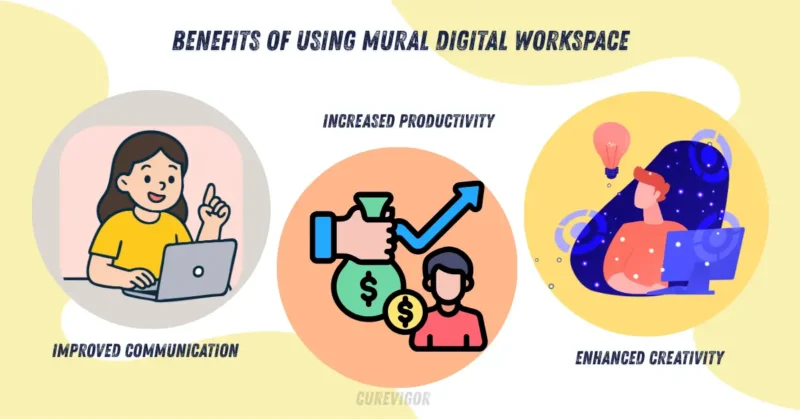
MURAL Digital Workspace isn’t just a digital whiteboard. It’s a communication and productivity tool rolled into one.
Improved communication
Visuals reduce misunderstandings. When ideas are visible, there’s less guessing.
- Everyone sees the same information
- Fewer follow-up meetings
- Clearer decisions
I’ve seen teams cut meeting time almost in half just by visualizing discussions.
Increased productivity
When work is organized visually:
- Tasks are clearer
- Priorities stand out
- Progress is easier to track
People spend less time asking questions and more time doing the work.
Enhanced creativity
Creative thinking flows better when ideas are visible and movable.
- Brainstorm freely
- Group ideas easily
- Build on each other’s thoughts
This is why many design and innovation teams rely on the Mural digital workspace daily.
Key Features of MURAL Digital Workspace
Visual Collaboration in MURAL Digital Workspace
Visual collaboration is the heart of MURAL.
Instead of long text explanations, teams use:
- Mind maps
- Flowcharts
- Kanban boards
- User journey maps
- Strategy canvases
These visuals help teams think together, not just talk together.
During a product kickoff, our team mapped the entire user journey on a single mural.
Marketing, design, and engineering could finally see how their work connected. That single visual replaced three documents and five meetings.
Key visual tools include:
- Drag-and-drop elements
- Color-coded sticky notes
- Pre-built templates
- Infinite canvas space
No running out of room. Ever.
Real-Time Collaboration in MURAL Digital Workspace
Real-time collaboration makes teamwork feel natural, even when people are far apart.
With MURAL Digital Workspace, teams can:
- Edit boards together
- Leave comments
- Use @mentions
- Share screens
- Facilitate live workshops
You see cursors moving. You see ideas forming.
It feels surprisingly human.
Why this matters for team communication:
- Faster feedback
- Higher engagement
- Less misalignment
For remote team collaboration, this feature alone is a game-changer.
Implementing MURAL Digital Workspace
Getting Started with MURAL Digital Workspace
Starting doesn’t need to feel overwhelming. Here’s a simple approach that works for most teams:
Step 1: Set up your workspace
Create spaces for teams, projects, or departments.
Step 2: Choose templates
Use ready-made templates for:
- Brainstorming
- Sprint planning
- Retrospectives
- Workshops
Step 3: Invite your team
Keep the first session small. Let people explore.
Step 4: Run a guided session
Facilitate one clear activity. Don’t try everything at once.
I always recommend starting with a brainstorming session. It’s familiar and builds confidence fast.
Best Practices for MURAL Digital Workspace Adoption
Adoption matters more than features.
I’ve seen tools fail not because they were bad, but because teams weren’t supported.
Best practices that work:
- Start with one clear use case
- Assign a facilitator or champion
- Encourage participation, not perfection
- Allow messy boards early on
Change takes time. Visual collaboration is a skill. Let people grow into it.
MURAL Digital Workspace for Different Teams
MURAL Digital Workspace for Remote Teams
Remote teams often struggle with:
- Time zone gaps
- Communication delays
- Feeling disconnected
MURAL Digital Workspace helps bridge those gaps.
How it supports remote team collaboration:
- Async brainstorming
- Clear visual documentation
- Shared context across locations
I once worked with a fully remote team across four time zones. We used one mural as our “single source of truth.” No one felt left out.
That sense of inclusion matters.
MURAL Digital Workspace for Design and Creative Teams
Creative teams need space to explore ideas.
MURAL provides:
- Wireframing tools
- Concept boards
- Mood boards
- Feedback zones
Designers can sketch ideas. Stakeholders can comment directly on visuals. No long explanation needed.
Benefits for creative thinking and innovation:
- Faster idea generation
- Better collaboration
- Stronger alignment
This is why many teams say MURAL Digital Workspace is the ultimate tool for brainstorming and workshops.
MURAL Digital Workspace: Features, Benefits, and Use Cases
Let’s look at how teams actually use it.
Common use cases include:
- Strategy planning
- Agile ceremonies
- Design sprints
- Training sessions
- Team retrospectives
Each use case benefits from clarity, visibility, and collaboration.
For agile teams, visual boards make work tangible.
For innovation teams, free-form space sparks creativity.
How MURAL Digital Workspace Improves Remote Collaboration
Remote work isn’t just about location. It’s about connection.
MURAL Digital Workspace improves remote collaboration by:
- Making thinking visible
- Encouraging participation
- Creating shared ownership
People feel heard when their ideas are on the board.
That changes team dynamics significantly.
MURAL Digital Workspace vs Other Collaboration Tools
You might wonder how it compares.
Compared to basic whiteboards:
- More structure
- Better facilitation tools
- Scales for large teams
Compared to documents or slides:
- More interactive
- Better engagement
- Easier collaboration
MURAL isn’t trying to replace everything. It fills the gap between thinking and planning.
Using MURAL Digital Workspace to Boost Team Engagement
Engagement drops when people feel passive.
MURAL Digital Workspace invites action.
Ways it boosts engagement:
- Everyone contributes visually
- Quiet voices get space
- Ideas are valued equally
I’ve seen introverted teammates contribute more in murals than in meetings. That alone makes it worth using.
Practical Checklist: Is MURAL Digital Workspace Right for You?
Use this checklist to decide.
- Your team works in a remote or hybrid environment
- Meetings feel unproductive
- Ideas get lost after discussions
- Collaboration feels uneven
- You want better team communication
If you checked three or more, MURAL Digital Workspace can help.
What to Avoid When Using MURAL Digital Workspace
Even great tools can be misused.
Avoid these common mistakes:
- Overloading boards with too much content
- Skipping facilitation
- Treating murals like static documents
- Ignoring onboarding
Keep it simple. Keep it human.
Action Plan: Getting Real Value from MURAL Digital Workspace
Here’s a simple action plan you can follow this week.
- Choose one team or project
- Define one goal (brainstorm, plan, review)
- Create one mural
- Facilitate one session
- Reflect and improve
Small steps lead to real adoption.
FAQs
Q. What is Mural software used for?
- Mural software is used for visual collaboration and team communication.
- Teams use it to brainstorm ideas, plan projects, run workshops, and map out workflows.
- It replaces whiteboards and long meetings with a shared digital space.
- Remote and hybrid teams often use Mural to stay aligned.
- It’s popular for design thinking, agile planning, and strategy sessions.
- The goal is clearer thinking, better collaboration, and faster decisions.
Q. What is a digital Mural?
A digital mural is an online visual workspace where ideas are displayed visually.
It works like a virtual whiteboard but with more structure and tools. People add sticky notes, diagrams, images, and text in one shared space.
Teams can collaborate in real time or asynchronously. Digital murals help organize thoughts and make discussions more concrete. They’re especially useful for remote team collaboration and workshops.
Q. Which one is better, Miro or Mural?
- Neither tool is universally better. It depends on how your team works.
- Mural focuses strongly on facilitation, workshops, and structured collaboration.
- Miro offers more flexibility and a broader set of use cases.
- Facilitators and design teams often prefer Mural for guided sessions.
- Product and engineering teams may lean toward Miro.
- The best choice is the one your team consistently enjoys using.
Q. What is the purpose of a Mural?
- The purpose of a mural is to make thinking visible.
- It helps teams share ideas, align faster, and collaborate more effectively.
- Instead of talking around ideas, teams see them clearly on a board.
- Murals support brainstorming, planning, and problem-solving.
- They reduce confusion and improve team communication.
- In simple terms, murals turn conversations into action.
Q. Is Mural free to use?
- Yes, Mural offers a free plan with limited features.
- The free version is good for small teams or basic use.
- It allows you to create a few murals and collaborate with others.
- Advanced features, such as facilitation tools, require a paid plan.
- Many teams start free and upgrade as needs grow.
- It’s a low-risk way to explore visual collaboration.
Q. Is Miro better than Canva?
- Miro and Canva serve very different purposes.
- Miro is built for team collaboration, planning, and workflows.
- Canva focuses on graphic design and visual content creation.
- For brainstorming and team communication, Miro is the better choice.
- For marketing visuals and social media content, Canva is the best option.
- They’re not competitors, just tools for different jobs.
Final Thoughts
Good collaboration doesn’t happen by accident. It needs the right space, the right tools, and the right mindset.
MURAL Digital Workspace creates that space. It helps teams see clearly, think together, and move forward with confidence.
If your team feels stuck, scattered, or disconnected, this might be the shift you need.
Try one session.
One board.
One honest conversation.
Explore MURAL Digital Workspace and see how visual collaboration can transform your team’s communication and productivity.
Read more articles on Life Balance and Productivity.
You might like: