Night Shift Eye Strain: How to Stop Dry Eyes & Screen Fatigue. Discover easy protocols and display tweaks to relieve eye strain.
To stop dry eyes and screen fatigue on the night shift, optimize your visual environment from the inside out.
Lower screen brightness to match your room, and position monitors 4 to 6 inches below eye level to reduce tear evaporation, perform gentle squeeze-blinks during regular screen breaks, and protect your eyes from sudden morning daylight with dark sunglasses right after your shift ends.
Working the night shift presents unique physical challenges that daytime workers rarely encounter. While your body works against its natural circadian rhythm, your eyes face an even harsher battle. For hours at a time, overnight workers stare at glowing screens while sitting under intense commercial lighting.
This combination creates a severe form of visual fatigue known as Digital Eye Strain or Computer Vision Syndrome. Over time, eyes become chronically dry, irritated, red, and exhausted.
Protecting your eyes overnight is not about medical treatments or complicated therapies. Instead, simple daily habit adjustments, workstation ergonomics, and environmental tweaks can transform your comfort.
Quick Summary Box
The Problem: Night shift workers suffer from severe Digital Eye Strain and dry eyes due to high-Hz fluorescent flickering, sharp screen contrast, and a 50%+ reduction in natural blink rates.
The Solution: Relieve eye fatigue by enforcing the modified 20-20-20 rule, lowering monitor height below eye level, shifting display temperatures to warm tones, using preservative-free lubricating drops, and wearing polarized sunglasses on the morning commute home.
This guide provides comprehensive, non-medical strategies to eliminate eye fatigue, stop persistent dryness, and protect your visual comfort throughout any graveyard shift.
Why Night Shift Lighting Destroys Eye Comfort
The human eye relies on balanced ambient light to process visual information without effort. During standard daytime hours, natural indirect sunlight fills space evenly. At night, offices, control rooms, healthcare facilities, and home workspaces rely on high-intensity artificial light sources.
High-Hz Fluorescent Flicker & Micro-Muscle Fatigue
Commercial buildings predominantly rely on overhead fluorescent tubes or cool LED fixtures. Even when lighting appears steady to the naked eye, fluorescent ballasts emit a rapid, continuous micro-flicker.
Your visual cortex processes this rapid, invisible flickering throughout your shift. The tiny ciliary muscles inside your eyes, which control focus, must continuously adjust to compensate for micro-variations in illumination.
After six to eight hours under these lights, your eye muscles become overworked, leading to deep aching behind the eyes, tension headaches, and rapid fatigue.
The Contrast Trap: Bright Screens vs. Dark Environments
In many overnight work environments, workers dim ambient lighting to stay awake or focus better. However, staring directly into a bright monitor within a dim or dark room creates a sharp visual contrast.
When your surroundings are dark, your pupils naturally dilate to let in more light. Yet, when you look back at your bright screen, your pupils attempt to constrict. This continuous conflict forces your pupillary muscles into overdrive, drastically accelerating screen fatigue.
Key Symptoms of Computer Vision Syndrome in Shift Workers
Recognizing how eye strain shows up lets you make adjustments before severe discomfort sets in. Overnight workers frequently experience a combination of visual and physical warning signs:
| Symptom Category | Specific Indicators | Common Workplace Triggers |
| Surface Irritation | Grittiness, burning sensation, excessive watering, redness | Low indoor humidity, direct HVAC airflow, reduced blink frequency |
| Visual Performance | Blurred vision, temporary double vision, slow refocusing | Staring at small fonts, high screen glare, inadequate contrast |
| Physical Tension | Soreness behind the eyes, forehead tightness, neck/shoulder pain | Slouching toward monitors, improper screen height |
| Light Sensitivity | Photophobia, stinging under bright overhead lights | Unfiltered fluorescent light, mismatched monitor brightness |
The Science of Dry Eyes: Reduced Blink Frequency
One of the main causes of discomfort for night shift workers is tear film evaporation. Every time you blink, your eyelids spread a thin, protective layer of fluid containing water, oils, and mucin across the cornea’s surface.
This tear film hydrates the eye, washes away tiny dust particles, and maintains visual clarity.
Under normal conditions, a person blinks roughly 15 to 20 times per minute. However, studies show that when we focus intently on digital displays, our blink rate drops by over 50%, to just 5 to 7 blinks per minute.
Blinking Routine Table
| Blinking State | Action | Time Interval | Next Action | Tear Film Status |
| Normal Blinking Routine | [Blink] | 3–4 Seconds | [Blink] | Tear Film Intact |
| Screen Focus Routine | [Blink] | 10–12 Seconds | [Blink] | Tear Film Breaks Down & Evaporates |
Furthermore, many blinks during screen focus become incomplete, meaning the top eyelid fails to touch the bottom eyelid completely.
As a result, the lower portion of the eye remains exposed to dry office air, causing the tear film to break down prematurely. Over a 12-hour shift, this can lead to chronic surface inflammation, burning sensations, and a gritty feeling, like sand is stuck in your eyes.
5 Practical Protocols | How to Stop Dry Eyes and Screen Strain
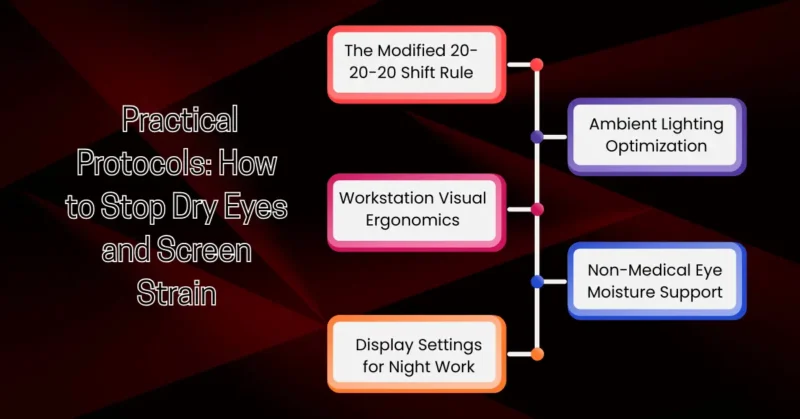
Eliminating eye strain requires proactive setup choices rather than waiting until your eyes feel sore and dry. Implementing these non-medical workplace protocols provides immediate relief.
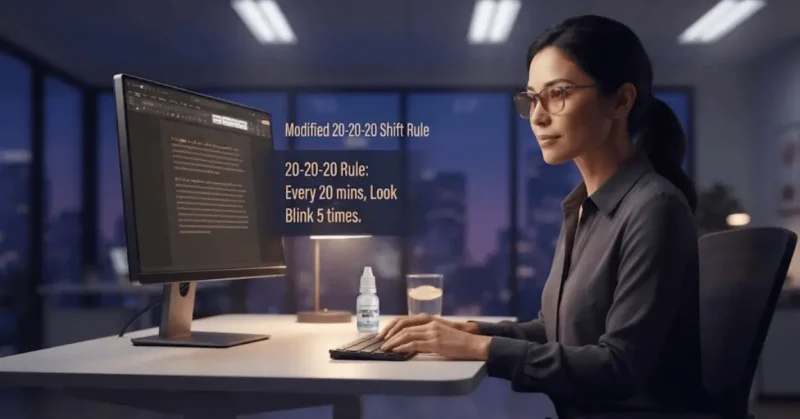
1. The Modified 20-20-20 Shift Rule
The traditional 20-20-20 guideline says to look away from your screen for 20 seconds every 20 minutes at an object 20 feet away. For night shift workers, this simple exercise can be modified for maximum benefit:
- Every 20 Minutes: Pause your typing or reading.
- Look 20 Feet Away: Direct your focus across the room or down a hallway away from artificial glare.
- Perform 5 Squeeze-Blinks: Close your eyes gently, hold closed for two full seconds, squeeze the eyelids together slightly, and open. This manual squeeze engages the ocular glands, releasing fresh lubricating oils across your cornea.
2. Workstation Visual Ergonomics
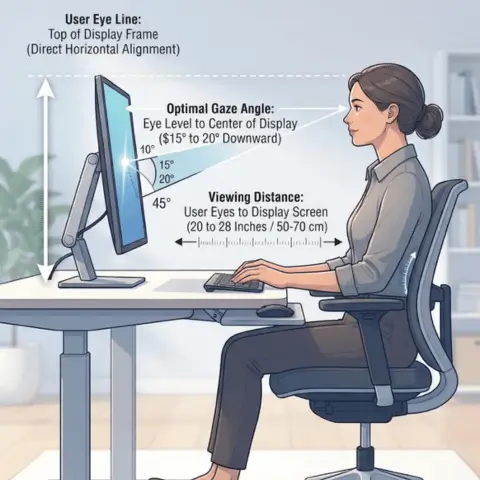
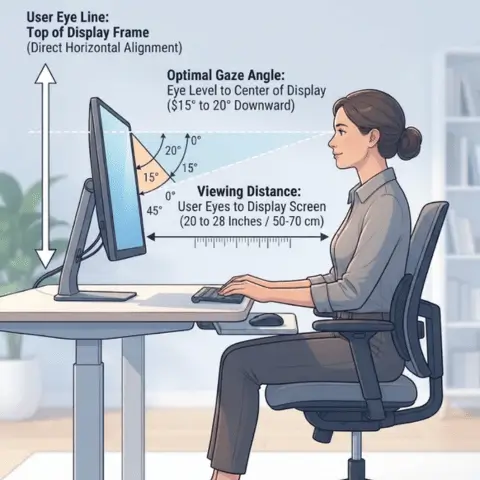
Positioning your monitor correctly minimizes physical neck strain and reduces the exposed surface area of your eyes.
Ergonomic Parameter Table
| Ergonomic Parameter | Reference Point / Target | Recommended Value / Metric |
| User Eye Line | Top of Display Frame | Direct Horizontal Alignment |
| Optimal Gaze Angle | Eye Level to Center of Display | 15 to 20 Degrees Downward |
| Viewing Distance | User Eyes to Display Screen | 20 to 28 inches (50 to 70 cm) |
- Distance: Place display monitors 20 to 28 inches (about an arm’s length) away from your face.
- Screen Angle: Set the center of the display screen 4 to 6 inches (15 to 20 degrees) below your direct horizontal line of sight. Looking slightly downward naturally lowers your upper eyelids, reducing tear evaporation by lowering the exposed corneal area.
- Reference Document Holders: Keep physical documents on a clip attachment directly beside your screen to avoid repeated head panning and refocusing.
3. Display Settings for Night Work
Default monitor settings are factory-tuned for bright daylight environments. Night shift workers must adjust display outputs to mirror ambient night settings.
- Brightness Matching: Match your monitor’s white background to the brightness of the wall behind it. If your screen glows like a light source in the room, it is too bright.
- Color Temperature (Warmth): Shift screen display temperatures from cool blue (6500K) down to warm amber tones (2700K to 3400K) using native software modes (such as Night Light or f.lux).
- Text Scaling: Increase font size to 125% or 150%. Reading larger text reduces unconscious micro-squinting and keeps eyelid muscles relaxed.
4. Ambient Lighting Optimization
If you can control your room lighting, eliminate harsh, direct overhead lights.
- Indirect Illumination: Use soft desk lamps with warm bulbs angled toward walls rather than shining directly toward your face or screen.
- Anti-Glare Panels: Apply matte screen covers over glossy displays to diffuse reflections from overhead light.
- Desk Placement: Angle screens at 90-degree orientations relative to overhead light banks to minimize direct glare paths.
5. Non-Medical Eye Moisture Support
Maintaining hydration across a 12-hour overnight shift helps keep mucous membranes functioning smoothly.
- Systemic Hydration: Drink cold water consistently throughout your shift. Relying heavily on coffee or energy drinks can have mild diuretic effects, accelerating dry mouth and dry eye.
- Preservative-Free Lubricating Drops: Non-prescription, preservative-free artificial tear drops provide instant physical moisture without chemical buildup. Apply 1 to 2 drops midway through your shift to re-establish tear film smoothness.
- Airflow Management: Position small desk fans away from your face. Direct HVAC vents upward or sideways so dry air does not blow across your eyes.
Managing Your Shift-to-Sleep Transition at Dawn
Protecting your eyes does not end when your shift finishes. The morning commute home exposes night-shift workers to intense daylight when their eyes are exhausted.
Here is that workflow converted into a clean, simple, copy-paste table—no code clutter:
| Step / Time | Action | Primary Goal |
| 1. Shift Ends (7:00 AM) | Put On Dark Polarized Sunglasses | Shield eyes from sudden morning sunlight during commute home. |
| 2. Post-Commute | Preserve Melatonin & Eye Rest | Avoid phone screens in bed to prevent circadian reset. |
| 3. Daytime Rest | Enter the Darkened Bedroom. | Promote deep corneal recovery and restorative sleep. |
1. Shielding Against Sunrise Glare
When leaving a dark facility into morning sunlight, wear dark, polarized sunglasses. Polarized lenses block harsh reflections from road surfaces and car windshields, reducing eye strain and limiting blue morning light that can reset your body clock before sleep.
2. Post-Shift Screen Fasting
Avoid looking at your smartphone during your morning wind-down or after climbing into bed. Staring at bright mobile screens right after a long shift delays restful sleep and prevents your eye tissues from recovering properly during daytime rest.
3. Daytime Sleep Environment
Ensure your bedroom is completely dark during the day. Use black-out curtains or a comfortable, contoured eye mask. Keeping your eyes in deep darkness during sleep allows corneal epithelial cells to repair and recover for your next shift.
FAQs on How to Stop Dry Eyes
Q. Why do my eyes feel drier during night shifts than daytime shifts?
Night shifts disrupt natural circadian rhythms, which can reduce tear secretion rates. Combined with dry indoor office air, low blinking rates from screen focus, and bright artificial lights, your tear film evaporates faster than your body can replenish it.
Q. Can blue-light glasses help reduce night-shift eye fatigue?
Blue-light blocking glasses filter out high-energy visible wavelengths emitted by LED screens and fluorescent lights. Many night-shift workers find they reduce glare and improve visual sharpness, making long shifts more comfortable. However, pairing glasses with regular screen breaks and proper screen distance yields the best results.
Q. Are preservative-free artificial tears safe to use every night?
Yes. Preservative-free lubricating eye drops are designed to mirror natural human tears and can be used whenever your eyes feel dry or gritty. Preservative-containing drops, however, should generally be limited to four times a day to avoid surface irritation.
Q. Does dark mode on monitors actually reduce eye strain?
Dark mode reduces overall screen brightness and can be helpful in low-light environments. However, if text contrast is too high (like pure white text on pitch-black backgrounds), it can cause visual halation or text bleeding. A dark gray background with soft white text is often easier on the eyes.
Q. Why do my eyes tear up uncontrollably when they feel dry?
Excessive tearing is a natural reflex to surface irritation. When your tear film breaks down and dry spots develop on the cornea, your brain sends emergency signals to the lacrimal gland to produce a flood of watery tears. However, these reflex tears lack the protective oils needed to stay on the eye, so they spill over without properly lubricating the surface.
Q. When should I seek professional evaluation for screen fatigue?
If you experience persistent eye pain, severe redness, blurred vision that doesn’t clear after rest, or chronic headaches, schedule an evaluation with an optometrist or ophthalmologist. They can check for underlying refractive errors or dry eye conditions and provide tailored guidance.
Final Takeaway: Protecting Your Vision Long-Term
Working the night shift doesn’t mean you have to live with chronic eye discomfort, grittiness, or screen fatigue. Your eyes are highly adaptable, but they need the right environmental support when you work outside standard daylight hours.
By taking control of your workstation ergonomics, adjusting screen warmth, staying hydrated, and taking structured blink breaks, you can reduce the physical strain of graveyard shifts. Small, proactive changes to your daily routine today will protect your vision, keep your focus sharp, and ensure you wake up refreshed for every shift ahead.
Read more about night shift workers’ health.