
The most reliable way to reduce kids’ screen time is to set a clear, age-appropriate limit; protect a few screen-free times and places every day (meals, bedrooms, and the hour before bed); fill the freed time with activities your child actually likes; and follow the same rules yourself.
Change one thing at a time, hold it for two weeks before adding the next, and expect a rough first week. Sudden bans usually collapse. Small, predictable limits usually hold.
This works because most harm from screens comes from what they displace, sleep, movement, play, and conversation, not from the glowing rectangle itself. Protect those four things, and screen time settles into a healthier place almost on its own.
Below you will find what the evidence actually says, age-by-age limits from the WHO and the American Academy of Pediatrics, a five-step plan, scripts for the pushback, and specific advice for parents whose work schedule, including night shifts, makes supervision hard.
Understanding the Screen Time Problem

Screen time means time spent on devices with screens: TVs, tablets, phones, computers, and game consoles.
Most guidelines focus on recreational screen time—entertainment, games, social media—rather than schoolwork. That distinction matters when you set rules. A child doing homework on a laptop is not the same as a child watching videos for a third hour.
Current Screen Time Statistics
These figures come from large surveys. They are averages, so many children use far more.
- Children under 8 average about 2.5 hours of screen media per day. Even children under 2 average close to 50 minutes (Common Sense Media, 2020).
- Tweens (8–12) average 5 hours 33 minutes of entertainment screen use per day, not counting school or homework. Teens (13–18) average 8 hours 39 minutes (Common Sense Media, 2021).
- In the United States, about half of teenagers (50.4%) report 4 or more hours of daily screen time (CDC/National Centre for Health Statistics, 2024).
Compare that with what health bodies recommend:
| Under 18 months | No screens except video chatting | AAP |
| Under 2 years | Sedentary screen time is not recommended. | WHO |
| 18–24 months | If introduced, high-quality content only, watched together | AAP |
| 2–5 years | No more than 1 hour a day; less is better; watch together. | WHO, AAP |
| 5–17 years | No more than 2 hours a day of recreational screen time | Australian and Canadian 24-Hour Movement Guidelines |
| 6+ years | Consistent limits that protect sleep, physical activity, and family time | AAP |
The Royal College of Pediatrics and Child Health in the United Kingdom adopts a different strategy. Its 2019 guidance says there is no proven “safe” number and tells families to judge screen use by whether it is crowding out sleep, exercise, schoolwork, and family time. That is a useful test, and the plan below builds on it.
Impact on Health and Development
Here is what the research supports—and how strong each finding is.
Sleep—strong evidence. Children who use phones or tablets at bedtime have about twice the odds of getting too little sleep, plus higher odds of poor sleep quality and daytime sleepiness (meta-analysis, JAMA Pediatrics, 2016).
Screen light delays melatonin, and engaging content keeps the brain switched on. Short sleep then affects mood, attention, and appetite the next day.
Movement and weight—consistent association. Hours on a screen are hours not spent moving. Screen time also brings food advertising and snacking. Higher screen time is consistently linked with higher body weight in children, although screens are one factor among many.
Eyes—growing evidence. Near-focused screen use and less outdoor time are both linked with myopia (nearsightedness).
A 2025 meta-analysis in JAMA Network Open found each extra hour of daily screen time was associated with about 21% higher odds of myopia. Time outdoors is protective; research most often cites about two hours a day.
Language and early development—association in the youngest children. In a Japanese study of more than 7,000 children, one-year-olds with 4 or more hours of daily screen time were more likely to show communication and problem-solving delays at ages 2 and 4 (JAMA Pediatrics, 2023).
The likely reason is displacement: babies learn language from back-and-forth interaction with people, and screens replace it.
Self-regulation — association in preschoolers. Children aged 3–5 who were often handed a device to calm down showed more emotional reactivity and weaker executive function months later, especially boys and children with strong temperaments (JAMA Pediatrics, 2023). The device works in the moment but skips the practice of calming down.
Mental health — real but complicated. The U.S. Surgeon General’s 2023 advisory notes that teens who spend more than 3 hours a day on social media face about double the risk of depression and anxiety symptoms.
Researchers still debate how much of this is cause and how much is effect — struggling teens may also turn to screens more. Both directions deserve attention.
Attention — mixed evidence. Heavy, fast-paced screen use is associated with attention problems in some studies, but screen time has not been shown to cause ADHD. Sleep loss, which screens do cause, worsens attention in every child.
The honest summary: the minutes matter, but what the minutes replace and what is on the screen matters more.
Modern Parenting Challenges

Parents today face problems earlier generations did not:
- School runs on screens. Homework, reading apps, and teacher messages arrive on the same devices used for games. “No screens on school nights” is no longer workable.
- Apps are built to hold attention. Autoplay, infinite scroll, and streaks remove the natural stopping points that television once had.
- Parents are stretched thin. A tablet is the cheapest, most reliable babysitter ever invented. Using it is not a failure; using it as the default is the problem.
- Parents’ own habits are visible. Children notice a phone at the dinner table long before they notice a screen-time rule.
A special case: parents who work nights. If you sleep during the day, your child may be awake for hours while you rest, on weekends, during school holidays, or throughout the preschool years. Screens fill that gap because they are quiet and safe.
Realistic goals matter more here than perfect ones: protect the windows when you are awake (one meal together, the bedtime routine), set up self-directed activity kits for the hours you sleep, keep rules consistent with the other caregiver, and treat protecting your own daytime sleep as part of the plan, because it is what makes engaged parenting possible.
Benefits of lower screen time
The benefits of reducing screen time come mostly from what replaces it. That is good news: you do not need to reach zero to see gains.
Better Physical Health
In a Danish randomized trial, families who cut recreational screen use to 3 hours a week for two weeks saw their children gain roughly 45 minutes of active, non-sedentary time per day — with no exercise program at all (JAMA Pediatrics, 2022). Movement simply filled the space. Removing screens an hour before bed helps restore sleep, and pushing play outdoors gives young eyes the daylight and distance focus they need.
Improved Mental Clarity
In the same Danish trial, children in the screen-reduction group showed fewer behavioral and emotional difficulties and more prosocial behavior after just two weeks (JAMA Network Open, 2024). Better sleep explains part of it. Less constant switching between apps, videos, and messages explains another part. Attention is a skill, and it needs uninterrupted practice.
Stronger Family Connections
Researchers call it technoference: technology interrupting face-to-face moments between parent and child. Parents who report more of it also report more child behavior problems (Child Development, 2018). A screen-free meal is a low-cost daily fix. The dinner table is where children practice listening, taking turns, and telling a story.
Better Social Skills
In a UCLA study, sixth-graders who spent five days at an outdoor camp without screens became noticeably better at reading emotions in faces than classmates who stayed home with their devices (Computers in Human Behavior, 2014).
Reading faces, tone, and body language is a skill built through practice with real people. Every hour of face-to-face play is practice.
5 best ways to reduce screen time
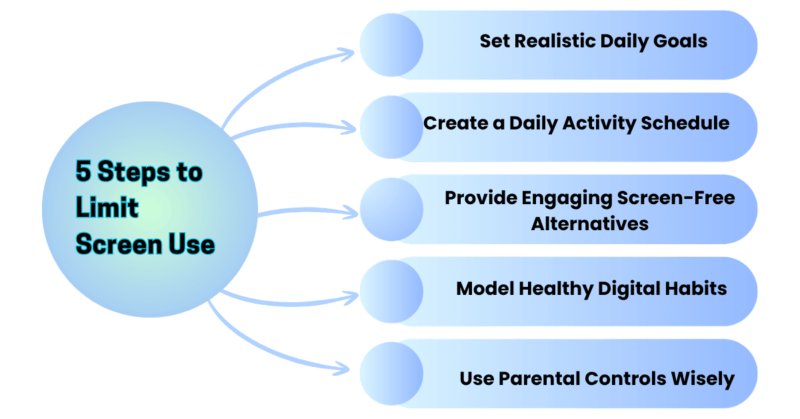
Work through these in order. Each step makes the next one easier.
Step 1: Set Realistic Daily Goals
Measure first. Before setting any rule, check one normal week of actual use. Apple Screen Time, Google Family Link, and console dashboards all show daily totals. Most parents underestimate by an hour or more.
Set a target by age, using the guideline table above as the ceiling, not the goal:
- Under 2: Video calls with family only.
- 2–5: Up to 1 hour a day, watched with you when possible.
- 6–12: Around 1–2 hours of recreational screen time on school days, with more flexibility on weekends as long as sleep and activity are protected.
- Teens: A fixed number rarely works. Set rules around sleep (8–10 hours), one hour of daily physical activity, screen-free bedrooms at night, and a cap on social media — the 3-hour mark is where the mental-health risk rises.
Cut by about a quarter, not to zero. If your child is at 4 hours, aim for 3. Hold it for two weeks. Then cut again. A child who drops from 4 hours to 1 overnight will fight the rule; a child who drops from 4 to 3 barely notices.
Judge quality, not just quantity. The AAP’s “5 Cs” framework is a practical checklist: the Child (age and temperament), the Content (slow-paced and age-appropriate?), whether screens are used for Calm (as a pacifier), what they Crowd out, and whether you keep Communication open about what your child watches and plays.
Step 2: Create a Daily Activity Schedule
Children accept limits more easily when they’re tied to times and places, not a parent’s mood. Four anchors capture most of the benefit:
- Meals are screen-free — for adults too.
- No screens in bedrooms overnight. Devices charge in the kitchen or hallway.
- Screens off one hour before bed. Replace with a bath, a book, or quiet play.
- The first 30–60 minutes after school are for moving, eating, and talking, not for the tablet.
A sample weekday for a 9-year-old:
| After school | Snack, outdoor play or sport |
| Late afternoon | Homework (school device only, notifications off) |
| Before dinner | 45–60 minutes of recreational screen time |
| Dinner | Screen-free family meal |
| After dinner | Free play, chores, reading |
| 1 hour before bed | Devices to the charging station; bath and book |
For children under 6, a picture timetable on the fridge works better than words. For teens, agree on the anchors together and write them down. A rule they helped write is a rule they are more likely to keep.
For shift-working parents, the anchors do not have to be yours. Any awake caregiver can hold them. If you are asleep after school, make that window an outdoor or activity-kit window, and move your family’s screen-free meal to the breakfast or weekend brunch you can attend.
Step 3: Provide Engaging Screen-Free Alternatives

Replacement works. Removal alone does not. A child with nothing to do will nag until the screen returns. Fill the space before you empty it.
Build a short “menu” with your child’s help, and keep the materials visible and within reach:
- Ages 2–5: Water play, building blocks, dress-up, sticker books, helping to cook, a daily walk to “find three things.”
- Ages 6–12: Bikes and scooters, card and board games, building or craft kits, a pet care routine, comics and audiobooks, a weekly library trip, a friend over.
- Teens: Sport or a gym, a part-time job, music, cooking one meal a week, volunteering, and unstructured in-person time with friends.
Outdoors counts double because it adds daylight and distance vision. Audio counts as a bridge: audiobooks and podcasts occupy the mind without a screen and work well during hours when a parent is resting.
For shift-working households, a quiet-time kit—a box with coloring, puzzles, a building set, an audiobook player, and a snack set—set out each morning gives a child a screen-free default while you sleep.

Step 4: Model Healthy Digital Habits
Children copy what they see far more than what they are told. Anyone who has taught knows that a rule announced by someone who breaks it is the first rule ignored.
Practical moves:
- Put your own phone on the charging station at meals and at bedtime.
- Narrate necessary use: “I’m checking the bus time, then it goes away.” Children learn the difference between using a tool and drifting.
- Keep one screen-free hour a day where the household does something together.
- Watch and play with your child when screens are on. Co-viewing, sitting with your child and talking about what is on the screen, turns passive time into learning time and shows you what they are actually watching.
If you work nights, your screen habits matter twice: for your children and for your own sleep. Scrolling before daytime sleep delays it just as it does for a child at night.
Step 5: Use Parental Controls Wisely
Parental controls are scaffolding, not a solution. They make the rules you set easier to keep. They do not replace conversation, and older children can often work around them.
Free tools built into most devices:
- Apple Screen Time (iPhone, iPad, Mac): app limits, downtime schedules, content filters, weekly reports.
- Google Family Link (Android, Chromebook): daily limits, bedtime, app approval.
- Microsoft Family Safety (Windows, Xbox): time limits and content filters.
- Console controls: Nintendo Switch Parental Controls app, PlayStation Family Management, and Xbox Family Settings.
- Platform profiles: YouTube Kids and child profiles on Netflix, Disney+, and similar services.
How to use them well:
- Set them up together. Explain what each setting does and why. Secret monitoring damages trust and teaches kids to evade it.
- Match them to age. Filters and hard limits for young children; time schedules and open reporting for tweens; fewer blocks and more conversation for teens.
- Use “downtime” for anchors, bedtime, and meals, so the device enforces the rule and you don’t have to.
- Review monthly. Loosen controls as your child shows judgment. The goal is a young adult who can manage a phone without software doing it for them.

Managing Common Parenting Pushback
Handling Resistance with Empathy
Expect resistance. It means the rule is real.
Name the feeling and hold the line. “I know it’s really hard to stop in the middle of a game. The rule is the same as yesterday.” Empathy lowers the temperature. Consistency ends the argument. One without the other does not work.
Give warnings before transitions. “Ten minutes.” Then “two minutes.” Then a natural stopping point, the end of an episode or a level, rather than an abrupt cut. Stopping mid-task is genuinely harder for a child’s brain than for yours.
Expect the storm before the calm. In psychology, this is called an extinction burst: when a behavior stops working, it usually gets louder before it fades. The first week of a new limit is often the worst.
Parents who hold steady typically see protests shrink by week two or three. Parents who give in on day four teach the child that a bigger protest works.
Do not negotiate during a meltdown. Wait until everyone is calm, then invite input: “What would make stopping easier?” A child who helps design the rule follows it better.
With teens, trade control for reasons. Explain sleep, explain the 3-hour social media line, and give them a say in the number. Teens accept rules they see as fair far more readily than rules they see as arbitrary.

Turning Boredom into Creativity
“I’m bored” is not an emergency. It is the moment before a child figures out what to do. Screens have removed that moment from many childhoods, and filling empty time is a skill that needs practice like any other.
- Wait 15 minutes before offering suggestions. Most children find something.
- Point to the menu, not the screen. “You can pick from the list or make something new.”
- Keep supplies out and mess acceptable. Creativity needs materials within reach and permission to make a mess.
- Protect unstructured time. A schedule that fills every hour with activities and screens leaves no room for the daydreaming that turns into play.
Balancing Schoolwork vs. Entertainment
The hardest modern problem: the homework device is also the game device.
- Separate the two where you can. A different device, or at least a different user profile with entertainment apps blocked during homework hours.
- Homework happens in a shared space, with notifications off and the phone in another room. Attention does not survive a buzzing phone.
- Time-box it. Twenty-five minutes of work, a five-minute movement break, repeat. Long, unfocused laptop sessions drift into entertainment.
- Do not make screens the automatic reward for homework. Making screens the prize teaches that screens are the most valuable thing in the house—and turns every assignment into a negotiation.
- Ask the school what is genuinely required online and what is optional. Parents often assume more than is needed.
FAQs on How to Decrease Screen Time
Q. How much screen time is healthy for my child’s age?
Under 2: none except video calls. Ages 2 to 5: Watch quality entertainment with you for no more than an hour each day. Ages 5–17: no more than about 2 hours of recreational screen time a day, with sleep and one hour of physical activity protected first.
These are ceilings from the WHO, the AAP, and national movement guidelines, not targets. If sleep, activity, schoolwork, and family time are intact, small differences above or below matter less.
Q. Does screen time cause ADHD?
No study has shown that screen time causes ADHD. Heavy, fast-paced screen use is associated with attention problems in some children, and children who already struggle with attention may be drawn to screens.
Screens clearly shorten sleep, and short sleep worsens attention in every child. If you have ongoing concerns about attention, talk to your pediatrician rather than relying on screen rules alone.
Q. Is educational screen time okay?
Good-quality educational content, especially watched together, is better than fast-paced entertainment, and video calls with relatives are valuable at any age. But “educational” apps still count against sleep, outdoor time, and play.
For children under 2, the evidence is clear that they learn far more from a person than from a screen. Judge the app by what it replaces.
Q. Should I use screen time as a reward or punishment?
Generally, no. Tying screens to behavior makes them the most valuable currency in the house and turns every day into a negotiation.
Reward your kid with other rewards, such as a later bedtime on Friday or a weekend activity of their choice, to reinforce good behavior.
Q. My child has a meltdown every time screens go off. What should I do?
Give warnings, stop at natural endpoints, stay calm, and do not give the screen back during the meltdown. Expect the first week or two to be loud; that is the extinction burst, and it fades once the protest stops working.
Replace your child’s reliance on a screen for calm with other calming tools—a quiet corner, a favorite book, slow breathing—since using a screen for calm indicates weaker self-regulation later
Q. How can I limit screen time when I work night shifts and sleep during the day?
Aim for structure, not supervision. Set out a quiet-time kit each morning, use device downtime settings to cap entertainment during your sleep hours, arrange outdoor or activity time with the awake caregiver, and protect one screen-free shared meal or the bedtime routine on the days you are home.
Accept that your child’s screen time may run higher on your sleep days than on your days off. Consistency across the household matters more than a perfect daily number, and protecting your own daytime sleep is part of the plan, not a luxury.
Q. When is a child’s screen use a problem that needs professional help?
Talk to a pediatrician, school counselor, or child psychologist if screen use is causing repeated loss of sleep, falling grades, withdrawal from friends and activities they used to enjoy, extreme distress or aggression when limits are set, hidden use, or exposure to harmful content.
These are signs of problematic use rather than an ordinary habit, and they respond better to early support than to stricter rules alone.
Final Takeaways
- Displacement is the real problem. Protect sleep, movement, play, and conversation first.
- Treat guideline numbers as ceilings, and cut by about a quarter at a time.
- Anchor rules to times and places—meals, bedrooms, the hour before bed.
- Replace before you remove. Build a menu of things your child actually likes.
- Model the habits. Your phone at dinner teaches more than any rule.
- Use parental controls as scaffolding, set them up together, and loosen them over time.
- Hold steady through the first loud week. It gets quieter.
Start tonight with one anchor. Move every device—yours included—to a charging station outside the bedrooms. This week, check one week of real usage on your child’s device.
This weekend, hold a 15-minute family meeting and write down three rules everyone agrees to; the free Family Media Plan tool from the American Academy of Pediatrics (HealthyChildren.org) is a good template. Reassess in two weeks, then add the next change.
Disclaimer: This article offers general parenting and health information, not individual medical or psychological advice. Every child is different. If you are concerned about your child’s development, sleep, mood, or behavior, consult a pediatrician or a qualified child mental health professional.
Read more on health tips.
You might like to read: